Build a workspace
Save the current desktop, inspect exactly what will move, restore after display changes, rescue off-screen title bars, and undo the latest move.
- Preview
- Restore
- Rescue
A focused Mac workspace utility
Restore a saved desktop and rescue off-screen windows—without moving anything blindly. Then capture a long page, keep the Mac awake, copy text that cannot be selected, write a quick note, or record a demo.
macOS 13.1+ · Apple Silicon + Intel · Direct download
First launch: this public preview is locally signed, not yet Developer ID notarized. See the 3-step install →
Windows scattered after every restart
WorkspacePreviewed, repeatable placement
A reference longer than the screen
⌃⌥ SOne complete tall PNG
Words trapped inside pixels
⌃⌥⇧SEditable text on the clipboard
A build that must keep running
Keep AwakeThe Mac stays awake while the display rests
A product demo split across several tools
StudioRecord, trim, frame, and export locally
Quick Panel · Window Finder · Presentation · Linked Resize · Shortcuts
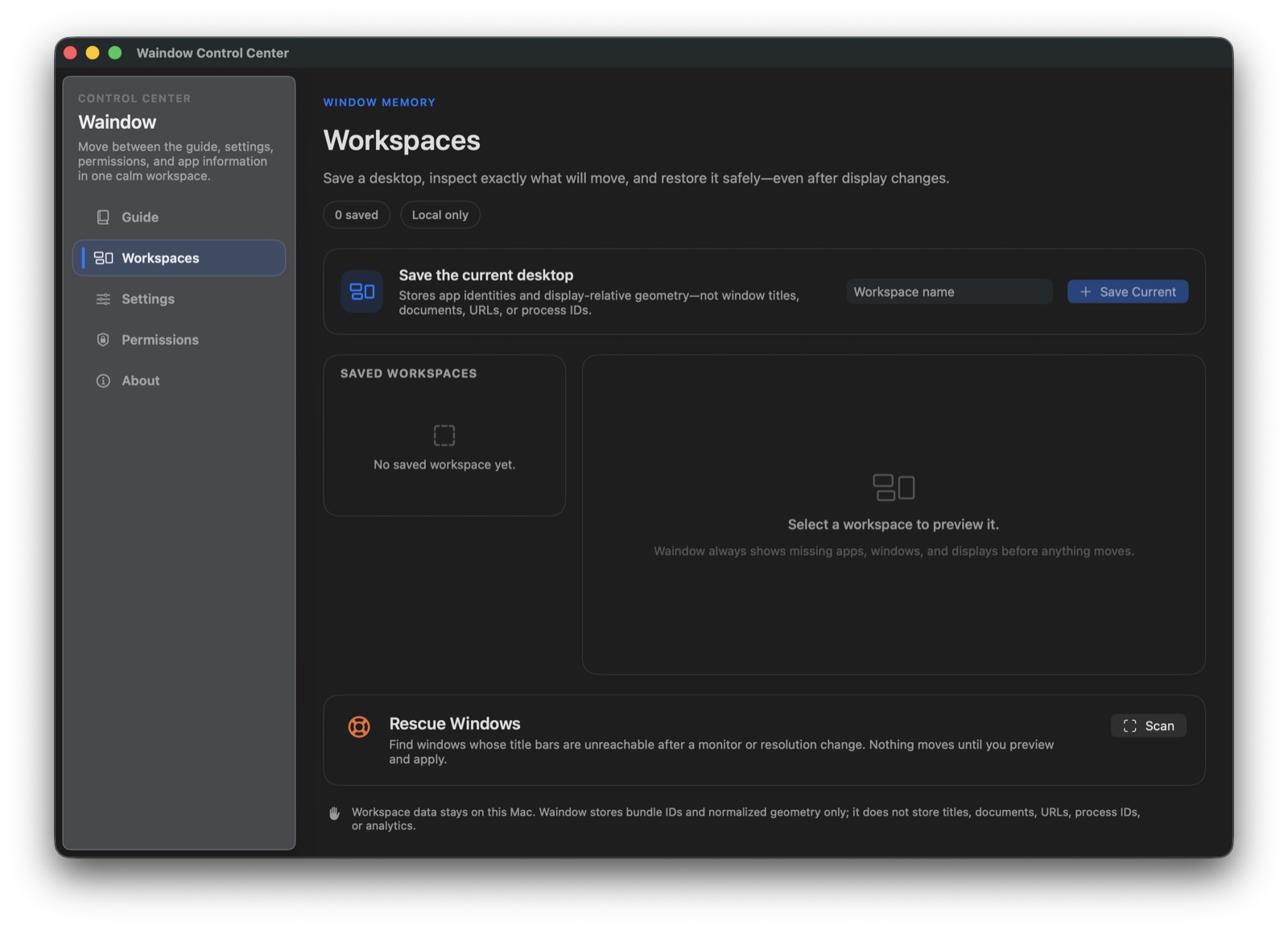 Actual appWaindow 1.10.0
Actual product · No mockup
This is the actual Workspaces screen. Waindow stores privacy-safe app identities and display-relative geometry, shows missing windows or displays before anything moves, and can rescue title bars stranded off screen.
Download the same appWhat does Waindow solve?
Waindow combines the desktop actions people otherwise scatter across several menu-bar apps: window layout, context notes, on-demand window search, long-page capture, presentation tools, local demo recording, display focus, sleep prevention, and optional local automation.
One focused toolkit
No built-in AI, payment system, voice model, progress monitor, or decorative media bundle. Just practical native tools with a clear reason to exist.
Save the current desktop, inspect exactly what will move, restore after display changes, rescue off-screen title bars, and undo the latest move.
Catch an idea in the local Quick Memo Inbox, attach it to a window later, and find open or archived Markdown notes in one searchable library.
Turn a supported long page into one tall PNG, or drag over any visible region to copy its text without saving a screenshot. Recognition stays on device.
Prevent idle sleep for a duration or until a chosen time, with separate choices for the Mac and display.
Jump to an open window by app or title, darken connected displays with Blackout Mode, and optionally read total CPU or memory load from the menu-bar icon.
Point, spotlight, and annotate a live share, or use Waindow Studio to record a display, app, window, or region into a recoverable local project with non-destructive edits and MP4 or GIF export.
Click the menu-bar icon once for the complete menu, or double-click for shortcut-aware search across Waindow actions and recent workspaces.
Keep explicitly added files or text in a temporary shelf and take one fresh Mac health snapshot. Neither tool polls, watches, or keeps a history when closed.
Made for actual situations
Save · Preview · Restore · Undo
Keep Awake · Timer · Status
Long-page capture · Local PNG
MCP · CLI · Shortcuts
Presentation Tools · Studio · MP4 · GIF
No AI inside. Optional local control.
Waindow has no built-in AI model and does not monitor your prompts. If you choose, connect Claude Code, Codex, Cursor, Apple Shortcuts, or another compatible tool to a limited set of typed local actions—not your prompts, documents, screen, window titles, or existing memo text.
Trust through restraint
An honest recommendation
If you want a free, local, lightweight set of Mac desktop tools with optional external automation.
If you need cloud note collaboration, a built-in AI assistant, cloud video editing, process history, or a cross-platform app.
40 interface languages
English, 한국어, 日本語, 简体中文, 繁體中文, Español, Français, Deutsch, Português (Brasil), Italiano, Русский, العربية, Türkçe, Polski, Nederlands, Bahasa Indonesia, ภาษาไทย, Tiếng Việt, हिन्दी, Svenska, Dansk, Norsk Bokmål, Suomi, Čeština, Ελληνικά, Magyar, Română, Українська, עברית, Bahasa Melayu, Filipino, Català, Hrvatski, Slovenčina, Български, Slovenščina, Lietuvių, Latviešu, Eesti, فارسی.
Made by indiveloper
Waindow is built and used by indiveloper (@sornrus), a solo maker in Korea. Product decisions, wrong turns, and unfinished questions live on the same account—not as expert advice, but as the work happens.
Waindow 1.10.0
Free for macOS 13.1+ · No account · 7.77 MB